
Plugins add extra features to your WordPress site, making it more powerful and customizable. Whether you want to improve SEO, boost security, or add new functions, installing a plugin is simple.

Here’s a step-by-step guide on how to install a new plugin in WordPress.
1. Install a Plugin from the WordPress Plugin Directory
This method is the easiest and works for free plugins available in the WordPress Plugin Directory.
Steps:
-
Log in to your WordPress dashboard.
-
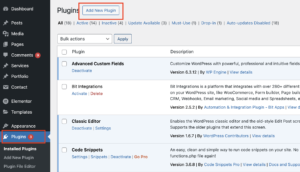
Go to Plugins > Add New from the left menu.
-
Use the search bar to find the plugin you want.

-
Click Install Now next to the plugin.

-
Once installed, click Activate to enable it on your site.
Your plugin is now active and ready to use!
2. Upload a Plugin Manually (For Premium Plugins)
If you purchased a premium plugin from a third-party site, you’ll need to upload it manually.
Steps:
-
Download the plugin .zip file from the plugin provider.
-
Go to your WordPress dashboard > Plugins > Add New.
-
Click Upload Plugin at the top of the page.
-
Select the .zip file and click Install Now.
-
After installation, click Activate Plugin.
The premium plugin is now installed and ready to configure.
3. Install a Plugin via FTP (Advanced Method)
If you’re having trouble installing a plugin through the dashboard, you can upload it via FTP.
Steps:
-
Download the plugin .zip file and extract it on your computer.
-
Connect to your website using an FTP client (like FileZilla).
-
Navigate to the wp-content/plugins/ folder.
-
Upload the extracted plugin folder to this directory.
-
Go to your WordPress dashboard > Plugins and click Activate.
This method is useful when your hosting provider has upload size limits that prevent normal installation.
Final Thoughts
Installing a plugin in WordPress is quick and easy. Most users will find the Plugin Directory method the simplest, but if you’re using premium plugins, uploading manually is the way to go. If you encounter issues, the FTP method can help.
Need help managing your WordPress site? Get expert WordPress support today!