
Broken links can harm your website’s user experience and SEO. This guide will show you simple ways to find and fix them in WordPress.
Table of Contents
- Check Links Manually
- Use a WordPress Plugin
- Use an Online Broken Link Checker
- Find Broken Links with Google Search Console
- How to Fix Broken Links
Check Links Manually
Manually checking links means clicking each one on your site to see if they work. This is only practical for small websites.
Use a WordPress Plugin
WordPress plugins like Broken Link Checker scan your website for broken links and provide an easy way to fix them.
Use an Online Broken Link Checker
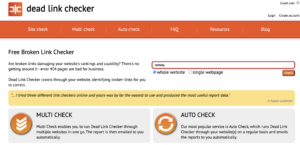
There are free tools like Dead Link Checker that let you enter your website URL to scan for broken links.
Find Broken Links with Google Search Console
Google Search Console can report broken links in the “Coverage” or “Crawl Errors” section. This helps identify broken internal and external links.
How to Fix Broken Links
To fix broken links, you can:
- Update the link to a correct URL.
- Remove the link if it’s no longer needed.
- Set up a redirect to a working page.
Regularly checking and fixing broken links keeps your WordPress site user-friendly and optimised for search engines.
Need help managing your WordPress site? Get expert WordPress support today!